

Claire
Rzain Consulting

The short answer: to download a video on a Mac, install RealPlayer® Downloader for Mac, copy the video’s link, paste it into the app and pick a quality. The file saves to your Mac for offline viewing. The app is free while RealPlayer for Mac is in early release, runs on macOS 15 or later with Apple Silicon, and needs no account or browser extension.
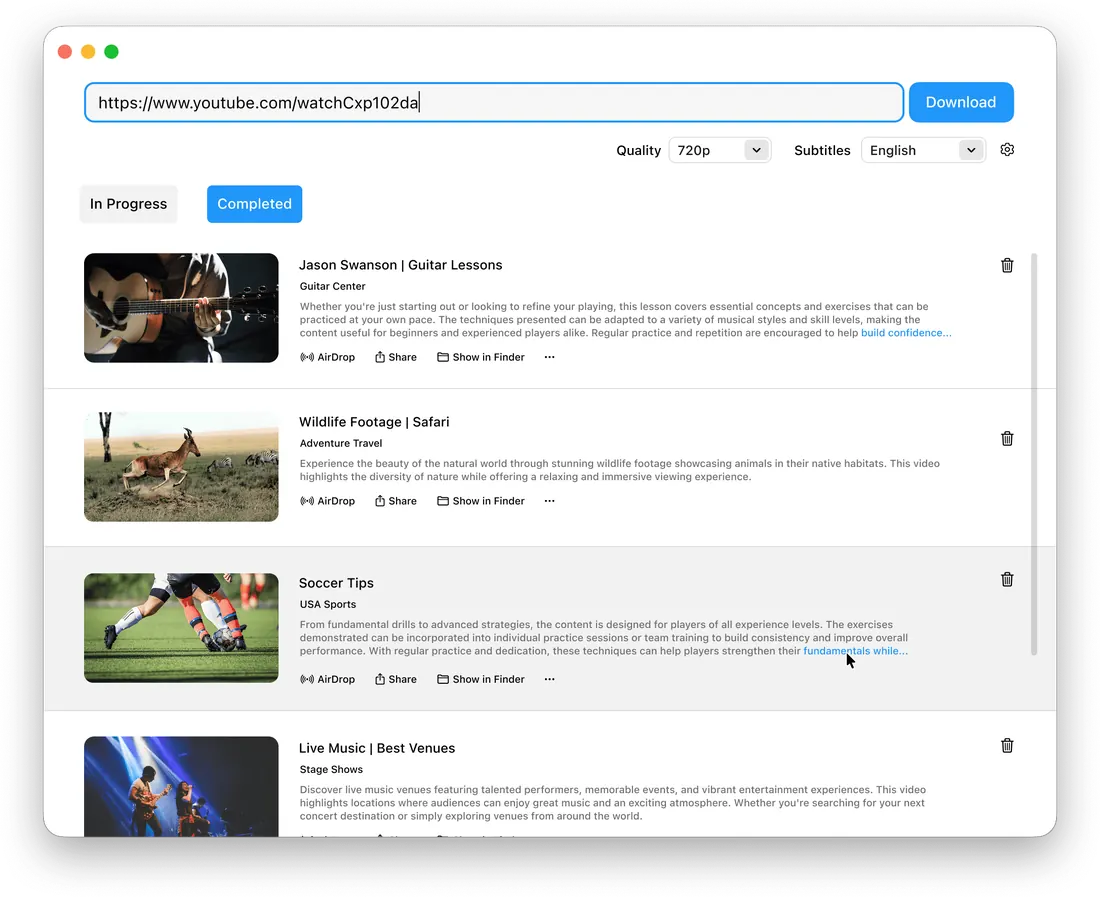
Saving a video to watch on a flight, keeping the audio from a talk, or moving a clip to your iPhone should take seconds. This guide shows how to do each on a Mac, what the app needs, and how it fits with RealPlayer on Windows and mobile.
RealPlayer Downloader for Mac is a native macOS app that saves online videos as files on your Mac. You paste a link, the app reads the page and lists every available version, and you choose the one you want. It works with YouTube, Vimeo and over 1,000 other sites.
Key features:
The whole process takes five steps.
Audio only. Choose audio instead of video before the download starts. You get an audio file that plays in any player, useful for podcasts, lectures and interviews.
AirDrop to iPhone. Click AirDrop next to a finished download and pick your iPhone. The file goes straight to your phone, with no cable or cloud upload.
RealPlayer Mobile. You can also add downloads to your RealPlayer library and open them in RealPlayer Mobile, which adds summaries and a table of contents for each video.
RealPlayer Downloader for Mac is free, light and self-contained.
| Item | Detail |
|---|---|
| macOS version | macOS 15 or later |
| Processor | Apple Silicon (M-series) |
| Price | Free while RealPlayer for Mac is in early release; no trial, no card |
| Account | None required |
| Browser extension | None; links are pasted into the app |
| Bundled software | None; the installer contains only RealPlayer Downloader |
| Uninstall | Drag the app to the Trash |
RealPlayer for Windows is a separate app with its own library, converter and DVD tools. The Mac app focuses on downloading and sharing. RealPlayer Mobile brings your library to your phone.
RealPlayer Premium ties the three together. It adds 25 GB of cloud storage, removes the ads, and keeps your library in sync across your Mac, your PC and your phone.
Is RealPlayer Downloader for Mac free? Yes, while RealPlayer for Mac is in early release. There is no trial period and no card to enter.
Which Macs does it run on? Macs with Apple Silicon running macOS 15 or later.
Do I need a browser extension to download videos on Mac? No. You paste the video link into the app itself, so nothing is installed in your browser.
Can I download just the audio from a video? Yes. Pick audio instead of video before the download starts and you get an audio file you can play anywhere.
How do I send a downloaded video to my iPhone? Click AirDrop next to the finished download and choose your iPhone. You can also open it in RealPlayer Mobile.
Does it work on Windows? The Mac app runs on macOS only. On a PC, use RealPlayer for Windows, a separate app with its own library, converter and DVD tools.
How do I uninstall it? Drag RealPlayer Downloader to the Trash. It leaves nothing behind.
Download RealPlayer Downloader for Mac free during early release, macOS 15 or later, Apple Silicon, no account needed.
RealPlayer is a registered trademark of RealNetworks, Inc.